Blog - Page 11 of 13 - DNA IT Solutions

Microsoft Azure Security Overview

Microsoft Azure Security overview DNA IT

With more emphasis on cyber security than ever, a question that we are often asked is how safe are the products and services that we offer.

Of course, we only offer world class, industry leading options to our clients that we are confident in.  So when it comes to Microsoft Azure we have full confidence in this as an option for clients, but don’t just take our word for it.  Here is some back up information from Microsoft themselves.

Vast Experience

Leveraging its decades-long experience building enterprise software and running some of the world’s largest online services, Microsoft has created a robust set of security technologies and practices. With over $1 billion invested annually in security, these innovations help ensure that Azure infrastructure is resilient to attacks, safeguards user access to the Azure environment, and helps keep customer data secure through encrypted communications as well as threat management and mitigation practices, including regular penetration testing.

Digital security landscape

The current digital security landscape for businesses can be described in one word: complicated. More numerous and advanced threats, more nebulous compliance requirements, more difficult and intricate infrastructure to secure.  Add in the mass proliferation of data, BYOD culture, and remote access and workforces, what you’re left with is a complex security puzzle lacking a clear solution.

While there isn’t an end-to-end security solution that covers all threats, Azure does have a robust set of native security tools; in addition to the many third party security tools that integrate seamlessly with Azure.

Security Centre: A holistic solution that provides increased visibility and tighter control of Azure workloads—making it easier to prevent, detect, and respond to threats in the cloud.

Azure seamlessly integrate with preferred third party security solutions.  Proven to rapidly and effectively detect and respond to threats with Microsoft’s global intelligence and expertise.

Log Analytics: An Azure service that helps gather and examine your cloud and on-premises data regardless of physical location which can reveal valuable insights through custom dashboards and visualizations.

Log Analytics works through a combination of data security methodologies, including: data segregation, data retention, physical security, incident management, compliance, and security standards certifications.

Key Vault: Enhance data protection, help ensure compliance, and manage and protect cryptographic keys, passwords, and other secrets that are used by cloud apps and services—all with one robust solution.

Key Vault is purposefully designed to ensure that only you have access to cryptographic keys and secrets used by your cloud apps and services.  Microsoft does not see or extract your keys.

Active Directory: An identity and access management cloud solution that provides a robust set of capabilities to manage users and groups. It helps secure access to on-premises and cloud applications, including Microsoft online services like Office 365 and many non-Microsoft SaaS applications.

Multi-Factor Authentication: An Azure service that heightens a customer’s overall security posture, protects data and applications, and doesn’t complicate sign-on procedures.

Azure Security Centre’s threat intelligence automatically collects, analyses, and compiles data from your Azure instances, your network, and any third party security solutions. A security alert is then created if a threat is detected—such as VMs communicating with malicious IP addresses, advanced malware detection, force attacks against VMs, and security alerts from integrated solutions.

Microsoft Azure is an option that many businesses around the world depend on.  Suitable for small, medium or enterprise size organisations and with great flexibility and scalability it could be the option for you.

For more information on Microsoft Azure and the benefits it could bring to your business you can  join Our FREE Webinar  or contact one of our team.

Don’t Take the Bait – Phishing is big business

Phishing DNA IT solutions

In recent times phishing attacks have become more prevalent and sophisticated.

Cyber criminals are learning more refined ways to prey upon people which is resulting in quite a few successful attacks.  In particular, they’ve taken advantage of the malware-as-a-service offerings on the dark web in order to increase the efficiency and volume of attacks. In fact, 91% of cyber attacks and their resulting data breaches now begin with a spear phishing email message.  Now, more than ever there is a need for a multi-layered defence against phishing attacks which combines advanced security technologies with educated, phishing-aware employees.

Sophos shared a white paper recently on this subject and we wanted to share some of their findings with you.  For the full report click here.

What is Phishing?

It’s that email you receive that looks like a request from your bank but when you click on it and enter your login details you are actually handing them over to criminals.  It has even become more than that now.

In 2016, the volume of attacks increased dramatically, fuelled by dark web services such as free phishing kits and phishing-as-a-service. It’s become increasingly simple for even the least technically inclined attacker to leverage advanced malware that’s been produced by someone far more savvy than they are. As such, 2016 has been dubbed the “year of ransomware”.

Improving efficiency and productivity

For the most part, cyber criminals will try extort money from you using ransomware or social engineering, or they’ll steal data and credentials that can be sold via dark web markets.

There has been a rise to more efficient attack distribution methods, with on-demand phishing services, off-the-shelf phishing kits, and new waves of attack types such as Business Email Compromise (BEC) that look to target higher value assets via  social engineering.

Phishing kits are now widely available for download from dark web forums and marketplaces, and give attackers all the tools they need to create profitable phishing attacks: emails, web page code, images, and more.

Attacks-as-a-service

In fact, attackers don’t even need to know how to create malware or send emails anymore. Ransomware-as-a-service allow a user to create an online account and fill out a quick web form, including the starting ransom price and a late payment price for victims. The provider of the service then takes a cut of each ransom paid, with discounts offered if the user is able to translate the malware code into new languages or if the volume of the attack exceeds a certain level

Phishing-as-a-service allows users to pay for phishing attacks to be sent for them, using global botnets to avoid known dodgy IP ranges. Guarantees are even made to only bill users for delivered email messages, much like any legitimate email marketing service.

Spear phishing  is where emails impersonating a specific sender or trusted source are sent to targeted individuals within organisations to try to get them to take certain actions, like sending money to spurious accounts.

Business Email Compromise attacks are so-named because they’re associated with employee email accounts being compromised rather than the sender address being spoofed. This makes attacks much harder to spot by end user.

The fight against phishing

Phishing emails come in all shapes and sizes, and unfortunately, no single product will fully protect your business from phishing attacks. A multi-layered defence against phishing attacks, combining advanced security technologies and educated employees is the only answer

Stop threats at the door

Your first opportunity to defend against phishing attacks and other email-borne threats is strong email and web filtering. Email protection is your watch guard, blocking 99% of unwanted email at the gateway, including malicious attachments, content, and URLs – long before an end user ever sees them. Web filtering is another must-have as a front-line defence, filtering and blocking infected URLs should your users click an email link.

Appropriate education is critical for ensuring that employees know how to spot and deal with these types of email messages. Look for solutions with editable campaign simulations that can be made relevant to your organisation.

Secure your last line of defence

If your click-happy end users inadvertently unleash potent, powerful malware onto your systems, there’s still ample opportunity to stop the damage – and even reverse its effects. Next-generation exploit prevention solutions will identify, analyse, and neutralize the effects of even the most advanced, unseen malware out there, and automatically clean up all trace of infection so you can get on with your day.

Know your business

Make sure your company processes are understood, that you encourage employees to question requests that seem out of character from other employees and senior managers and perhaps most important of all, ensure you have a two-stage approval process for all significant fund transfer requests. All the defences in the world aren’t going to stop an employee from unknowingly sending large payments to a thief without some proper checks and balances in place.

Sophos has powerful technologies that can protect you at each stage of an attack.  For more information visit Sophos or talk to the expert team at DNA IT Solutions, we work with Sophos to help protect clients from cyber attacks.

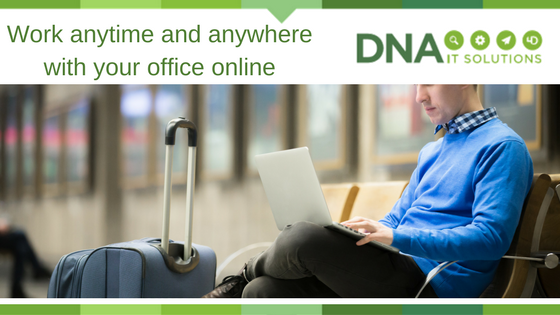
Work anytime and anywhere with your office online

work anywhere Microsoft 365 DNA IT Solutions

Office 365 is the apps you love.  It’s Word, Excel, PowerPoint, Outlook, OneNote, OneDrive, Publisher and Access.  All the tools you want in one place.

If you have ever used Microsoft Office then you will be delighted with Microsoft 365 office suite for business, it really is a fantastic tool. Whether it is remote working or office based, the Microsoft Office programs contained within enable you to do all that you need, from word-processing to e-mailing and spreadsheet work. But just what are the individual benefits of using Microsoft 365 software?

It’s always up to date

With an Office 365 subscription, you get the latest Office apps.  You will be able to access both the desktop and the online versions.  Any updates will be done when they happen so you are always up to date.

A key feature is that it is an online service that uses the internet to access a cloud-based sharing and storage solution for consumers. The ability to upload and share important documents that many people in different locations need access to is so vital for many businesses. There is great flexibility in how the documents are shared too, from whether people have read-only access to editing rights.

Stay connected

A great knock-on effect to this is that it enables all employees within a company to stay connected and in-touch. While this is all obviously a huge advantage for remote workers, it is also highly valuable for office-based workers too. If it is a large company, the ability to share or connect with a colleague without leaving your desk is key.

Working remotely

As a remote worker, Microsoft 365 gives you the freedom to be out on the road or at home yet still have access to everything you would if in the office. All the files and folders you need are there, ready to be accessed when needed, which avoids any rushed calls to the office to get them!

The full range of Microsoft Office applications is included, so it is simple to work with and you know you are using programs that you can trust. Microsoft have also made sure that it is fully mobile and tablet-friendly, so you can use it on whichever device you prefer or have to hand.

Overall, Microsoft Office 365 is a superb solution to your productivity needs and gives users the chance to stay fully connected via latest cloud technology wherever they happen to be and whatever time it may be. This is a great bonus for businesses who require this type of solution.

If you would like further advice on Microsoft Office 365 for your business, get in touch with DNA IT Solutions today.

Is technology holding your business back?

Technology holding business DNA IT

Technology is such a vital part of everyday life, particularly for businesses.

Do you find that your staff are often not able to work because the computers are down, that viruses plague your company and cause problems on your systems, or that your systems are simply outdated and don’t meet your current needs?

Reliable IT systems are vital

No business can afford to have unreliable IT systems that constantly fail. No-one can afford hours or days of downtime because their cloud files are suddenly inaccessible or backups that just didn’t work, losing years of hard work overnight.

It’s completely understandable that companies would much rather get on with the day to day running of their business, deal with current clients and focus on marketing to get more clients in the door than dealing with IT problems. But burying your head in the sand isn’t the way to deal with problematic IT systems. Businesses that take the time to plan their IT needs and ensure that constant support is available are way ahead of those who don’t.

What can you do?

Not everyone is an IT expert, and it can be very expensive to have a full-time expert member of staff that manages your systems, especially when you add in all the associated costs involved. One clear solution is to hire in IT services from a professional company.

Obviously, there is a monetary cost to having good IT support, but the cost of not having support when you need it far outweighs any financial outlay. Professional IT support can save time, increase efficiency and improve processes across the board, and even save money in the long run, simply by having someone who knows what they are doing look at your IT network and the best solutions for your company.

Benefits of having professional IT services:

• Ensure constant support for your network

• Reliable backup and recovery systems, to protect your vital files

• Support to get you back up and running quickly, should a fault or a problem occur

• Someone is always on hand to find the right solutions for you, so you aren’t over complicating things and spending more money than you need.

• Ongoing help and support, and the knowledge to prevent faults in the system in the first place

• Avoiding long periods of downtime, loss of information, and security issues by having the right systems in place and the monitoring and support to ensure they work smoothly.

• Proactive managed IT services that prevent problems, rather than waiting for something to go wrong and then trying to fix it.

• Removal of old systems that are unfit for purpose, and replacing them with a more efficient system that does exactly what you need it to do, which can save both time and money.

DNA IT is a Managed IT service provider who has been protecting and supporting IT systems for years, and would be happy to talk to you about your business IT needs. Call us to speak to our friendly and professional team for more information today

The country shut down for a day – did your business?

stormy day DNA IT Solutions

The recent stormy weather caused all sorts of mayhem throughout the country with power and water supplies affected and most people staying indoors.  Thankfully that weather has passed but who knows when the next storm could arrive.

Once the warnings came through on Sunday night for Hurricane Ophelia many businesses started to make plans for closing their office the next day.  Following expert advice, responsible companies knew they would be putting their staff at risk by asking them to come to the office that day.

Many businesses are still playing catch up from the loss of that day and with a bank holiday weekend ahead every day counts when you are trying to complete work assignments.

Work from Home

How you would have liked for your team to continue working for that day – from the safety of their homes?  Even if you could have had a fraction of the work completed off site, it may have made the difference in not missing a deadline or completing a project.   This is not a pipe dream, or indeed something only for large organisations.  It takes planning and thought but it can become a reality for any business.

What Technology?

Let’s look at just a few examples of the kind of technology that is available to organisations today.  For meetings you could use something like Webex, a Cisco product that allows participants to dial into a central point and share screens to discuss files or watch a presentation.  Just like being in the boardroom, both voice and video can be used and the sessions are recorded for later discussion.

Accessing shared files when out of the office can be done using a platform such as Autotask file sync and share. This allows team members to collaborate and access documents wherever they are, even if they are out of the office.  It’s a very secure platform and used by many organisations worldwide.

With the latest technologies in cloud computing it is becoming easier to share and access software and documents.  Having the ability to log into software from home and have the same capabilities as when in the office is of great benefit.

Security is always an issue that is top of the agenda when it comes to working online.  That’s why it is so important to have the correct levels in place to allow for exchange of data.  Encryption, protection of each device, protecting against attack and appropriate levels of security access are all important elements of cyber security.  All of which can be advised by your managed IT service provider.

Not just for stormy days

Once you have the systems in place it allows staff members to work remotely at any stage.  This is not just for the rare stormy or snow bound days.  The flexibility of being able to work from home on occasion is a great perk you can offer staff members and in some cases it can even prevent the loss of staff due to commuting time.

To find out more about the kinds of systems you can put in place for remote working in a safe environment you can speak to one of our expert team at DNA IT Solutions.

10 Tell Tale Signs of Phishing from Sophos

10 tell tale signs of phishing sophos DNA IT

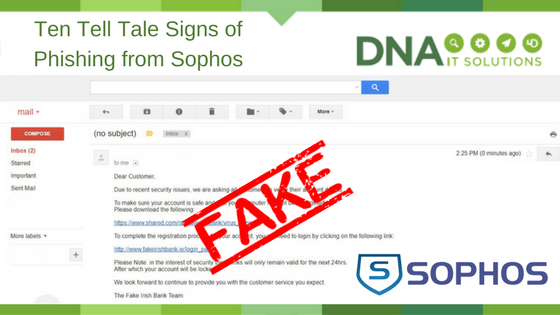
Sophos likes to make security simple for business.  They have provided the top 10  “tells” you can look for to help suss out potential scams.

  1. It just doesn’t look right. Is there something a little off with a particular email message? Does it seem too good to be true? Trust your instincts.
  2. Generic salutations. Instead of directly addressing you, phishing emails often use generic names like “Dear Customer.” This use of impersonal salutations saves the cybercriminals time.
  3. Links to official looking sites asking you to enter sensitive data. These spoofed sites are often very convincing, so be aware of what personal information or confidential data you’re being asked to reveal.
  4. Unexpected emails that use specific information about you. Information like job title, previous employment, or personal interests can be gleaned from social networking sites like LinkedIn and is used to make a phishing email convincing.
  5. Unnerving wording. Thieves often use unnerving wording (such as saying your account has been breached) to trick you into moving fast without thinking and in doing so, revealing information you ordinarily would not.
  6. Poor grammar or spelling. This is often a dead giveaway. Unusual syntax is also a sign that something is wrong.
  7. Sense of urgency. “If you don’t respond within 48 hours, your account will be closed.” By creating a sense of urgency, the thieves hope you’ll make a mistake.
  8. You’ve won the grand prize!” These phishing emails are common, but easy to spot. A similar, trickier variation asks you to complete a survey (thus giving up your personal information) in return for a prize.
  9. “Verify your account.” These messages spoof real emails asking you to verify your account. Always look for signs of phishing, and always question why you’re being asked to verify – there’s a good chance it’s a scam.
  10. Cybersquatting. Often, cybercriminals will purchase and “squat” on website names that are similar to official websites in the hopes that users go to the wrong site e.g. www.google.com vs. www.g00gle.com . Always take a moment to check out the URL before entering your personal information.

For more tips and tools to stop phishing, visit the Sophos website

If you want to discuss your business IT Security you can speak to an expert at DNA IT Solutions.  We partner with Sophos to provide end to send IT Security and support.

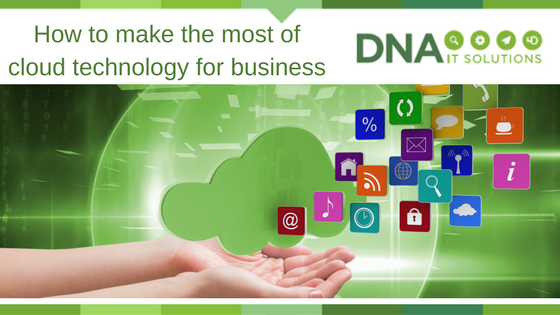
How to make the most of cloud technology for your business

Cloud Technology for business DNA IT

Cloud technology is not the future, it is the present.

This, a once intimidating and confusing technology, is now the norm and is something we use every day, often without realising it. This all begs the question; how can I find a way to make cloud computing help my business?
Cloud computing is the storing of files (of any sort) on the internet, rather than saving them locally on your hard drive. The benefits of this are numerous and can be utilised to make real improvements in how your business operates.

Cloud technology can make your business:

More secure – By storing files in the cloud, you will be making an important step in protecting the most valuable aspects of your business from the physical failure of your personal machines. For example, if you were to suffer an office fire or flood that destroyed your computer system, all of your data would be safe and retrievable from another device because it is not stored physically in your office but in a cloud system that stores a backup off-site.

More collaborative – Public cloud services allow multiple people to collaborate on the same document simultaneously, meaning that the days of emailing documents and presentations around the office for improvements and changes are gone, speeding up the process of collaboration and ensuring everyone always has the most up-to-date version of the document. This will make your business more time effective, less prone to human error, and will improve how well your team members are able to collaborate with one another.

More flexible and scaleable – Adding extra team members, sites, and storage options to cloud solutions is a painless and instant process, meaning that you can keep up with your thriving business and scale your IT network to suit in a quick, and cost-effective manner.

Does this sound like something your business could benefit from? DNA IT Solutions is a market leader in the provision of, and transition to, cloud solutions for businesses of any size. Contact us today and we will create a bespoke package that suits your business needs.

What is the Modern Enterprise?

The Modern Enterprise DNA IT

DNA IT Solutions are more than a company that just fix computer problems.  We are a Managed Service Provider with a range of services suitable for modern business today.

We work with you, as part of your team to ensure your IT systems are suitable for your business and that they allow you to grow and function at the optimum level.

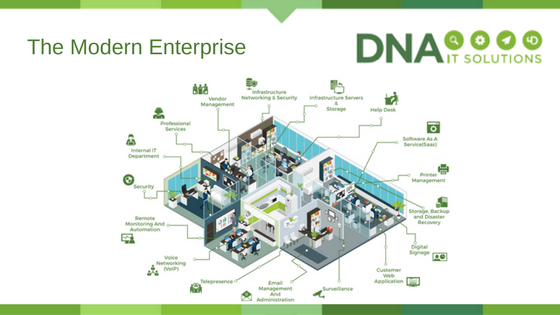
The modern enterprise looks a lot different from the office of yesterday.  With all the new functionalities come a need for many new types of service, all of which we provide.

Here are a few:

Help desk:  A team available to you whenever you need and always ready to help.  Somebody to identify what the issues are and either fix them remotely or send a technician on site should it be necessary.

Software as a service: Making sure you have the right software and maintaining it to the latest version.  Ensuring updates are done correctly with as little downtime as possible.

Printer management: Monitoring the printing activities and ensuring any maintenance or repairs are carried out quickly and efficiently.  Providing a more cost effective service by incorporating it into the overall service.

Storage and backup:  Storing business data in a secure location and ensuring that backups are done regularly and with the minimum of downtime.  Taking care that your information is easily accessible only by authorised people.

Disaster recovery: Should the unexpected happen, having a plan in place to get you back up and running is crucial.  Having the right procedures in place will mean getting back to business within hours not days and with as little loss as possible.

Customer web application: Offering you a client server software application which can be run in a web browser to make business processes run smoothly.  Applications designed for clients to suit their needs.

Surveillance:  Monitoring what is going on in your business 24 hours a day even when you are not there.  Protecting you and ensuring you have full knowledge of business activities even when working remotely.

Email management: Providing you with an email system that is not only fit for purpose but one that will be robust and not result in excess downtime.  Email is an important part of any business and a reliable system is crucial.

Telepresence: Not every worker is at the office from nine to five every day.  Systems are needed that are flexible for remote workers meaning that everybody is connected with a quality communication service.

Voice Networking: Having systems that allow communication at a low cost will be a great benefit to your business.  It’s important that the quality of connections are reliable also.

Monitoring:  It is important to react to issues, however, it is always better to be proactive to try and avoid the problems from happening in the first instance.  With remote monitoring, problems will be detected and resolved quickly.

IT  Security: Having the correct security level for all aspects of your business is vital.  Protecting data and protecting your business from attack is more difficult than ever and that is why expert help and top quality products are needed.

IT Department: Having an expert team to hand with a variety of skill sets is a huge advantage.  This allows smaller businesses to have access to a level of product normally only the largest of enterprises can access.

Professional Services: Having access to a team of industry experts will allow you to tap into a well of knowledge that can advise on IT strategies.  Important for your present business but also important when planning for future growth.

Vendor Management:  Having one contact for all relevant vendors will save time and hassle.  Having your expert team sourcing the best services and managing them effectively for you could end up more cost effective.

Infrastructure, servers & storage: Having the right solution for you for the time you are operating in but also having the flexibility to stretch and reduce when necessary will make financial sense.  Transitioning to the cloud or creating a hybrid solution or not moving at all, your IT expert team can guide your decision.

These are some of the services a Managed Service Provider like DNA IT Solutions can offer a business.  It’s a holistic approach that makes financial sense and gives peace of mind.  With clear monthly fees and a flexible can do attitude we are ready to show you what we can do for your business.

October is National Cyber Security Month

Cyber Security Month DNA IT

One of the key concerns for our clients is keeping their business data secure.

Hackers, ransomware, viruses are all words that strike fear due to the threat of untold damage and the negative repercussions that can follow.

European Cyber Security Month (ECSM) is an EU awareness campaign that promotes cyber security among citizens and organisations about the importance of information security and highlighting the simple steps that can be taken to protect their data, whether personal, financial or professional. The main goal being to raise awareness, change behaviour and provide resources to all about how to protect themselves online.

DNA IT Solutions offer a suite of products that can help protect our clients.  We work with world class companies such as Sophos, Watchguard, Fusemail, McAfee and many others to provide layers of security.  However, sometimes it’s an unwitting action from an internal user that causes mayhem.  So we also recommend that users get cyber security smart with some simple tips that may save a company from disaster.

Be aware of online scams

Don’t respond to unsolicited requests for information and certainly be sure of links before you click.  If you are not expecting that email from a contact, if the tone is not right then pick up the phone and call them to see if they sent it to you.  Sometimes you will be targeted by phone for information before being interacted with you online, so verify callers before you give information.  Beware of that ‘super prize win’ because if it looks too good to be true, it usually is.

Be password clever

It’s good practice to have a different password for each account and remember to change your password often.  When it comes to deciding on a password, keep personal information such as your name or pets name out of your password.  Longer passwords are stronger passwords so use a mix of letters, symbols and numbers.  Don’t share your passwords with others and beware of shoulder surfing to steal passwords.

Straightforward advice

Be careful what you browse on a shared device or when you are using an unfamiliar network.  Be careful of what you plug into your computer, ask yourself how reliable it is.  On your own device, keep software up to date for the latest security patches to stay safe.  Remember to back up your valuable information so in the event of a disaster you can get back up and running quickly.

By following this simple advice, you can help in the cyber security fight.  It’s important to ensure you have the right protection that is appropriate to your business and that’s where DNA IT Solutions can help.  We have an expert team that can give you access to the best technology available now.  For more information, get in touch with us today.

Cloud Security with Sophos & Microsoft Azure

cloud security DNA IT

With more and more businesses moving applications and workloads to the cloud there can be some confusion about securing them adequately. DNA IT Solutions work with both Microsoft Azure cloud and Sophos security solutions to help provide the optimum solution for organisations.

Security in the Public Cloud

Microsoft Azure is public cloud and Microsoft works hard to protect the cloud infrastructure. They regularly monitor network traffic and will respond to security issues so you can have confidence in selecting this option. Azure manages security of the cloud but the security of your information in the cloud is up to you.

This is where Sophos can help.

Sophos provide solutions to help you properly secure your cloud environment. Sophos XG Firewall is available in the Microsoft Azure Marketplace. You can deploy XG Firewall on Azure to help provide the protection your data needs as it moves through Azure. Sophos XG Firewall gives you additional layers of security from the Azure Virtual Network through the application layer in a single modular solution. XG Firewall is available as a pre-configured, virtual machine in the Azure Marketplace. You can select XG Firewall, apply Azure Resource Manager templates, and easily deploy to your environment.

Defending Against Hacks and Attacks

Cybercrime is on the rise, Sophos and Microsoft Azure provide services that can help you meet your security, privacy and compliance requirements. The important thing to remember is that when you run your applications and workloads in the cloud you are also responsible for ensuring protection for those applications and workloads.
As with any infrastructure, whether on-premise or in the cloud, security should be a core functional requirement. Security policies and controls must be implemented to protect mission-critical information from accidental or deliberate theft, leakage, integrity compromise, and deletion.

Here are some questions to consider as a starting point:

• How is your data routed, and what kind of protection do you have for that routing?
• How is performance affected by implementing a security solution?
• Where does your data reside? Is it encypted? Who has access to it?
• What type of protection do you need? Web-layer, network-layer, both? More?
• Do you have protection in place for known threats? What about threat protection to identify and block unknown (zero-day) threats?
• Do you understand how your users behave in your cloud infrastructure? How do you identify and separate out risky users?
• What type of policy and rules are you using? Is there overlap or ineffective rules? How do you identify more effective ways to manage your security?
• Sophos has a network of partners capable of helping you think through security concerns in order to develop and implement controls and protections that are right for Sophos XG Firewall

Sophos XG Firewall on Azure combines mutiple security tools into one solution and is designed to prevent sophisticated attacks and advanced threats in the cloud while providing secure remote access to the Azure cloud for trusted users.

Sophos XG Firewall complements the infrastructure protection provided by Azure with many advanced management features and deployment capabilities including:

• Global deployment options, with the ability to establish separate XG Firewall instances in multiple countries.
• Sophos Firewall Manager software, which provides fast setup and a single console for the complete central management of the firewall.
• Built-in reports that tell you what’s happening with your users and your network.
• User Threat Quotient reports that show you which of your users are putting your Azure-based systems at risk.
• Pre-defined policy templates that let you quickly protect applications like Microsoft Exchange or SharePoint.
• Patented Layer-8 identity control, which enables user-level controls over applications, bandwidth and other network resources regardless of IP address, location, network or device.

Conclusion

Sophos XG Firewall is a “next-generation” firewall you can select and launch from within the Microsoft Azure Marketplace. XG Firewall deploys as an all-in-one solution that combines advanced networking, protections such as Intrusion Prevention (IPS) and Web Application Firewalling (WAF), as well as user and application controls. XG Firewall is designed to help you protect your Azure-based workloads against advanced threats.

For more information on this you can check out the Sophos website or speak with one of our experts that will explain how Sophos and Microsoft Azure may be the option for your business.