 Skip to content

Day-to-day IT































Microsoft Intune & Microsoft Managed Desktop (MMD)
Secure and Automated Device Management
In today’s digital workplace, businesses need secure, efficient, and scalable solutions to manage devices while ensuring compliance and security. Microsoft Intune and Microsoft Managed Desktop (MMD) provide a comprehensive approach to modern IT management, enabling organizations to streamline operations, enhance security, and support a flexible workforce.
What is Microsoft Intune?
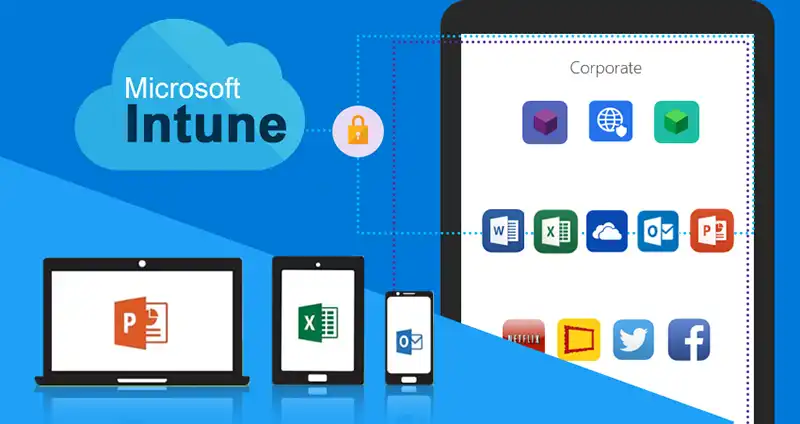
Microsoft Intune is a cloud-based endpoint management solution that allows businesses to securely manage devices, apps, and data from a central platform. It provides IT teams with the tools needed to enforce security policies, ensure compliance, and enable remote work without compromising control over company data.
What is Microsoft Managed Desktop (MMD)?
Microsoft Managed Desktop (MMD) is a fully managed service that delivers a secure, up-to-date, and high-performing Windows experience. MMD combines Microsoft 365, cloud-based device management, and AI-powered security monitoring to ensure organizations benefit from automated updates, proactive security, and optimized performance.
Key Benefits of Microsoft Intune & MMD

1. Secure and Automated Device Management
With Microsoft Intune, IT administrators can remotely manage devices across multiple locations. Whether employees use company-issued or personal devices, Intune ensures data protection, device encryption, and access control to keep business information secure.
2. Streamlined Deployment & Simplified IT Management
MMD provides a fully managed Windows experience, taking the burden off internal IT teams. Through zero-touch deployment and cloud-based configurations, businesses can quickly onboard new employees while reducing the complexity of IT management.

3. Real-Time Updates & Compliance
Keeping devices secure and compliant is critical. Intune and MMD automate security updates to protect against cyber threats and ensure regulatory compliance. These solutions help organizations meet NIS2 and other cybersecurity regulations effortlessly.
How DNA IT Solutions Can Help?
Implementing Microsoft Intune and MMD requires the right expertise to ensure a smooth, secure, and optimized deployment. At DNA IT Solutions, we provide:
- Expert Consultation & Strategy: We assess your business needs and design a customized Intune and MMD strategy that aligns with your IT goals.
- Seamless Deployment & Integration: Our team ensures a hassle-free setup, integrating Intune and MMD with your existing Microsoft 365 environment.
- Security & Compliance Support: We help enforce best-in-class security policies, ensuring compliance with industry regulations such as NIS2.
- Ongoing Management & Support: Our managed IT services ensure continuous monitoring, updates, and troubleshooting to keep your devices secure and optimized.
With DNA IT Solutions, you can confidently embrace a modern, secure, and automated IT environment that supports your business growth. Let us help you leverage Microsoft Intune & MMD to enhance security, streamline IT operations, and empower your workforce.
Related Articles
What you need to know about Microsoft 365
What is Office 365 and how does it differ from Microsoft Office? Office 365 refers. . .
10
Apr
Apr
What is Sharepoint?
What actually is SharePoint and how can it work for your business? That’s a question. . .
23
Jul
Jul

What is Microsoft Dynamics and how can it enable your business to grow?
Microsoft Dynamics 365 is a cloud powered service. It combines both CRM (customer relationship management). . .
15
Jan
Jan
Microsoft Intune & Microsoft Managed Desktop (MMD)
Microsoft Intune is a cloud-based endpoint management and security solution that enables organisations to manage and secure laptops, desktops, mobile devices and tablets with a unified platform. With Intune, businesses can enforce security policies, deploy applications, manage device compliance and control access to corporate resources — all from the Microsoft 365 admin centre. As part of DNA IT Solutions’ Modern Workplace services, Intune helps Irish businesses protect sensitive data, support remote and hybrid work, and reduce risk with centralised device governance and modern management capabilities.
-
What is Microsoft Intune?
Microsoft Intune is a cloud-based management tool that lets organisations manage devices, applications and security policies from a central platform. -
What types of devices can be managed with Intune?
Intune supports a wide range of devices including Windows PCs, Macs, iOS and Android mobile devices and tablets. -
How does Intune help secure business data?
Intune lets you enforce security settings, manage access controls, apply compliance policies and protect data with conditional access and encryption controls. -
Can Intune manage mobile phones as well as laptops?
Yes. Microsoft Intune manages mobile phones, tablets and laptops across platforms, giving organisations consistent policy enforcement across all endpoints. -
Does Intune integrate with Microsoft 365?
Yes. Intune integrates deeply with Microsoft 365 and Azure AD to provide unified identity management and secure access to business resources. -
How does Intune support remote working?
Intune allows secure access to corporate apps and data from remote devices while applying security policies and monitoring compliance, making remote work safer and easier. -
What is the difference between Intune and traditional on-premise management?
Intune is cloud-native and doesn’t require local infrastructure hardware — unlike on-premise systems — which simplifies deployment and reduces hardware dependencies. -
Can Intune help with application deployment?
Yes. Intune lets IT admins deploy, update and manage applications across all enrolled endpoints remotely. -
Is Microsoft Intune suitable for small and medium businesses?
Yes. Intune is scalable and cost-effective for SMBs that need enterprise-grade device control without complex infrastructure. -
How does DNA IT Solutions help deploy Intune?
DNA IT assesses your IT environment, customises Intune policies for your business needs, deploys device management, and provides ongoing support and monitoring.